
Lesson 4. Chip-Seq data analysis
The geneXplain platform provides a comprehensive suite of workflows and methods for processing Chip-Seq/ATACseq data. To browse the full list, navigate to the Start page and select the Chip-seq tile.

Identify and Classify Target genes near interval
This workflow can be accessed from the start page or Analyses/Workflows/Common folder or from the Chip-seq tile on the start page:

The workflow helps to identify genes located near the ChIP-seq peaks or near other genomic intervals. The input can be any track, and the output contains a table of genes overlapping with the fragments of the input track.
By default, the gene bound extensions are 10,000 bp 5’ relative to TSS and 10,000 bp 3’ relative to the last exon.
Input form:

In the first step, the input track ( ) is converted into a gene set using the Track to gene set analysis , The resulting Ensembl gene list is then submitted to Functional classification by several ontologies: GO biological processes, GO cellular components, GO molecular function, TF classification, Reactome pathways, and HumanCyc pathways. In parallel, the same Ensembl gene list is subjected to Cluster by shortest path analysis. Gene/protein clusters are calculated based on the GeneWays interaction network.
For demonstration, we have saved a sample Chip-seq file in the public folder. You can access them from here.
Once the workflow is completed, output files are opened by default in the work space.

All output files can be accessed here.
For each ontological term several parameters are calculated, including expected number of hits, actual number of hits, p-value, as well as hit names and the link to the corresponding ontological term.

The same workflow can be applied with licensed databases TRANSPATH(R) and HumanPSDTM. In that case there will be additional ontological mapping to TRANSPATH Pathways.

You can check the output of the above workflow with here

Site search on track using GTRD
You can perform Site search on your Chip-Seq data using GTRD database.
- Open the method using the link below:
- Drag and drop the input track file (Chip-seq sample data) in the input form, Profile used should be GTRD profile moderate threshold
- Press ‘Run’
The output track file with predicted sites is opened in the work space in the Genome Browser.

You can also open the file as a table to get a tabular view on the output.

Each row presents details for each individual match for every PWM. Columns Sequence (chromosome) name, From, To, Length and Strand show the genomic location of the match including chromosome number, start and end positions, strand and length of the match, respectively. The column Type contains information about the type of the elements; in this case all matches are considered as “TF binding sites”.
Further columns keep information about PWM producing each match (column Property:commonScore) and score for the whole matrix (column Property:score).
Common Score: A normalized measure of how closely a sequence matches the consensus motif of a transcription factor.
Score: The raw binding affinity score calculated from the transcription factor’s position weight matrix for that specific site.
Property: siteModel contains an identifier for the site model, which is the matrix together with the cutoff applied.
Site search on Chip-seq data using TRANSFAC
Site search can be performed using TRANSFAC by using the pre-defined workflow that integrates the method TRANSFAC MATCH for tracks with other methods. This tool predicts binding sites in DNA sequences for a collection of positional weight matrices (PWMs) according to the Match™ algorithm. This workflow requires TRANSFAC license.
You can open the workflow from the start page Chip-Seq tile using the link below:
Here is the input form filled with the sample input file used above and TRANSFAC profile.

The output folder contains several track files and can be accessed here.


ChIP-seq data can also be analyzed with several other workflows available under the TRANSFAC and TRANSPATH licenses.
ChIP-Seq – Identify TFBS combinations in ChIP-Seq peaks
The workflow can be accessed from the start page, Chip-seq tile
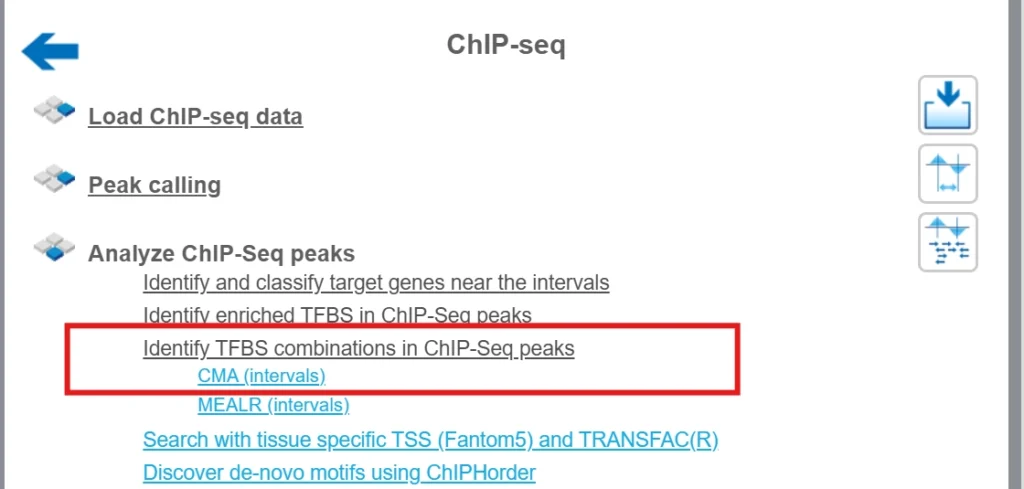
Check out output files generated by the workflow here
Chip-seq video
Watch the following video for Chip-seq/ATAC-seq data analysis
Why a License Matters
A licensed TRANSFAC® package gives you:
- Complete and current datasets unavailable in free versions.
- Regular updates and professional support from the geneXplain team.
- Possible Integration with TRANSPATH® and HumanPSD™ for pathway, disease, and drug insights.
- Reproducible, publication-ready results trusted in academia, pharma, and translational research.
To summarize, licensing TRANSFAC® is not just an upgrade—it’s an investment in scientific accuracy, data integrity, and discovery speed.
It provides the depth, precision, and interpretability required to confidently move from sequence data to biological understanding and translational outcomes.